
Approving Custom Class Requests
Users have the ability to request custom classes in simpldiscipline. All requests must be approved by a school administor with the "reviewer" role.
To approve these requests, navigate to the Reviewer Area and select Class Approvals from the left-hand navigation menu.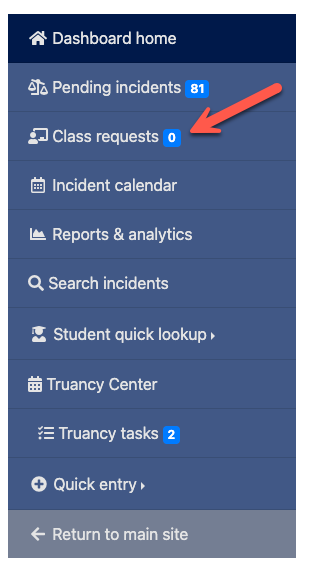
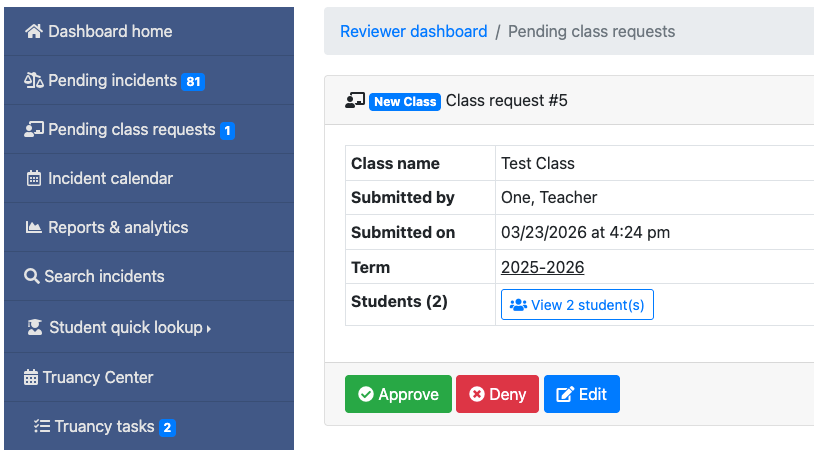
To approve these requests, navigate to the Reviewer Area and select Class Approvals from the left-hand navigation menu.
On the approval page, you can click "View Students" to see the full roster. You also have the ability to edit the roster (add or remove students), deny the request, or approve the course.
Items to Note:
- If a teacher has access to multiple locations (such as a middle school and high school), the administrator at the selected primary location is responsible for approving the course. For example, if a teacher selects the middle school as the primary location but includes both middle and high school students, only the middle school administrator will need to approve the roster.
- Visibility settings for the course follow the selected primary location.
- Courses are automatically approved when submitted by users with Reviewer or Super Admin permissions.
DataImage30.png
DataImage9.png
| Files | ||
|---|---|---|
|
|
DataImage30.png
40 KB
|
|
|
|
DataImage9.png
74 KB
|