
Creating Custom Courses / Classes
Courses from your Student Information System (SIS) are automatically synced to simpldiscipline. In some cases, teachers or administrators may need additional course rosters that are not part of the standard SIS schedule.
While it is possible to create courses directly in your SIS (which will then sync to simpldiscipline), the platform also supports creating custom courses directly within simpldiscipline.
To create a custom course:
1.Navigate to My Classes
2.Click the Create Class button in the top right corner
This allows you to quickly set up additional rosters without needing to modify your SIS. Note: All custom courses require approval from a school-level administrator (a user with the Reviewer role) before they become active.
Enter the required details, including the class name, school location (if you have access to multiple locations, a primary location must be selected), and term.
Note: Administrators also have the ability to create a course and assign it directly to a teacher.
Next, select your students. Teachers can choose any student within their school and also have the option to mass import students by course or grade level. School administrators have additional import options, including students by IEP/504 status or from a list containing the 25 students with the highest number of discipline incidents this school year.
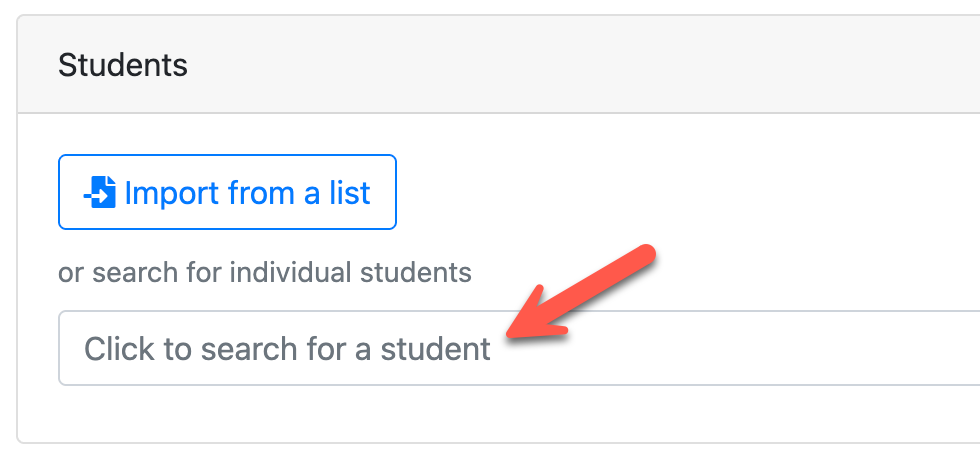
Once you have built out your roster, select Submit Class Request to send the course to a school administrator for approval.
Items to Note:
- If a teacher has access to multiple locations (such as a middle school and high school), the administrator at the selected primary location is responsible for approving the course. For example, if a teacher selects the middle school as the primary location but includes both middle and high school students, only the middle school administrator will need to approve the roster.
- Visibility settings for the course/students follow the selected primary location.
- Courses are automatically approved when submitted by users with Reviewer or Super Admin permissions.
DataImage27.png
DataImage15.png
DataImage88.png
DataImage27.png
| Files | ||
|---|---|---|
|
|
DataImage27.png
54 KB
|
|
|
|
DataImage15.png
24 KB
|
|
|
|
DataImage88.png
100 KB
|
|
|
|
DataImage27.png
44 KB
|