
Add/Delete Minor Behaviors, Actions, and Activity Options
Super Admin users have the ability to add, update, or remove Minor Infraction actions, activities, and behaviors. To get started, navigate to the Admin Area by selecting the red Admin Area button.

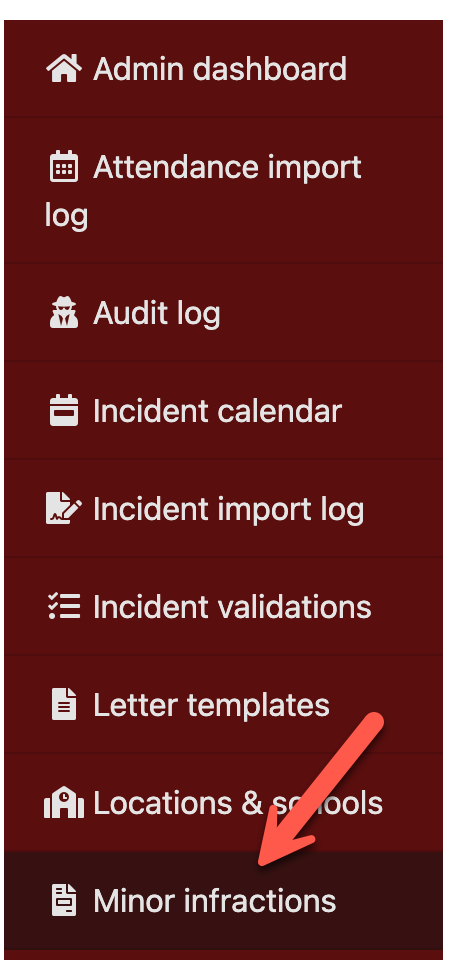
From the left-side navigation menu, select Minor Infractions.



On this page, you will see three sections:
•Minor Actions
•Minor Activities
•Minor Behaviors
To add a new item, select Add New within the appropriate section (Action, Activity, or Behavior), then enter the required details.
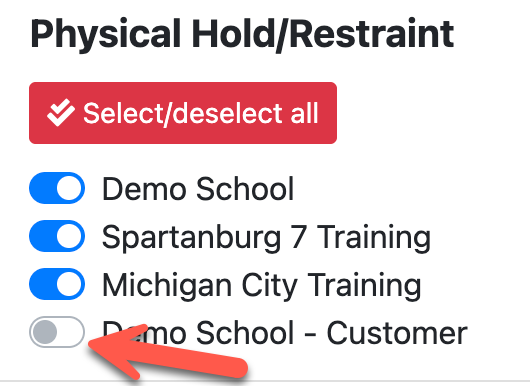
Within each section, you also have the ability to enable or disable items by school location.
- Toggling an item off will remove it from selection moving forward, so users will no longer be able to choose it when documenting new minor infractions.
- Any existing records that previously used that item will not be affected. Those records are preserved for historical accuracy and will continue to appear in Reports and Analytics.
DataImage48.png
DataImage6.png
DataImage23.png
DataImage76.png
DataImage42.png
DataImage21.png
| Files | ||
|---|---|---|
|
|
DataImage48.png
35 KB
|
|
|
|
DataImage6.png
69 KB
|
|
|
|
DataImage23.png
82 KB
|
|
|
|
DataImage76.png
81 KB
|
|
|
|
DataImage42.png
83 KB
|
|
|
|
DataImage21.png
50 KB
|